
Singapore Airlines FAQs
How to activate your Corporate Membership and Book your Flights
Do I need to be a member of BFD to access the airfare discounts?
Yes. You must be a member of the BFD community via the Business for Doctors website in order to access the airfare discounts provided by Singapore Airlines.
Process outlined below:
- Register as a BFD member: Business for Doctors – Register and Login – Business for Doctors
- Sign up to register your interest: https://businessfordoctors.com/singaporeairlinesoffer/
- We will then upload you into the high flyer portal and if you meet the requirements of the promotion you will receive an email from Singapore Airlines to register as a high flyer as per below:
Email you should receive:
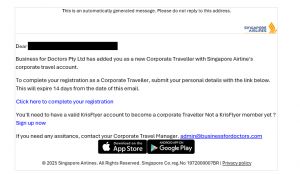
What you need to do, once you've registered you're expression of Interest with Business for Doctors?
Once you’ve registered an expression of Interest.
We will then prioritise members who are planning to book their travel in the next 2 months and travel within 6-12 months. If you meet the requirements you will receive an email from the 1st of Jan onwards.
If you have any questions regarding the offer you can email us at admin@businessfordoctors.com
This is the email you will receive from Singapore Airlines:
How do I book my flights with Singapore Airlines?
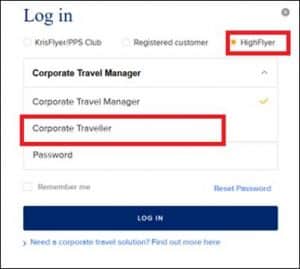
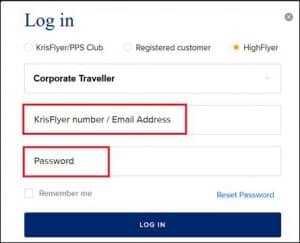
All travellers should process their bookings via the Corporate Portal link: https://www.singaporeair.com/en_UK/au/corporate/highflyer/highflyer-programme/ and proceed to the LOG-IN info. Your log in will be under Corporate Traveller(this was previously mentioned as Corporate Travel Manager). Please refer to the Log in screen images shown below.
You can add your KrisFlyer credentials or email address along with your password to complete the login process.
“Discounts are for use when making bookings for “business purposes” only”
If your partner is not a Doctor:
Family members of BFD Doctors can be registered and will need to follow the process indicated below:
To arrange this, email admin@businessfordoctors.com with the following details:
-
Partner/Spouse/Family member’s full name (as it appears on their passport)
-
Job title where applicable
-
Email address (avoid special characters)
-
KrisFlyer number
-
Subject: Singapore Airlines Partner/Spouse/Family Member Enrolment (as applicable)
Once added to the portal, the member will need to log in and must make their own booking individually. After both bookings are completed, please email, highflyer_support@singaporeair.com.sg with both the booking references to have them linked.
How do I book flights when travelling with a child?
Adult and child flights are booked through different steps.
Adults should be booked first via the Corporate Traveller Portal as usual.
Once the adult booking is complete, email High Flyer Support (highflyer_support@singaporeair.com.sg) with:
- The adult booking reference details
- The child’s passport details
High Flyer Support will then complete the child’s flight booking.
You will receive an automatic reference email from High Flyer Support confirming they have received your request. High Flyer Support will follow up directly with the adult traveller to:
- Provide the child’s booking details
- Request payment for the child’s flight
Children should not be booked directly through the online portal. All child bookings are managed by High Flyer Support after the adult booking has been completed. You can do this directly with Singapore Airlines High Flyer Support and BFD do not need to be involved.
Can my partner take advantage of this offer?
FAQ: Can my partner access the Singapore Airlines corporate airfare discount?
All passengers must be registered in the High Flyer portal to access the corporate discount.
If your partner is a Doctor and a BFD member:
-
They must be registered on the High Flyer portal using their own details. (Follow steps here https://businessfordoctors.com/singaporeairlinesoffer/)
-
They must make their own flight booking individually.
-
Once both bookings are completed for the same flight, email highflyer_support@singaporeair.com.sg with both booking references to have the bookings linked so you can travel together.
If your partner is not a Doctor:
Non-health professionals cannot register as Business for Doctors members. However, a workaround allows partners to be added to the High Flyer portal and access the corporate discount.
To arrange this, email admin@businessfordoctors.com with the following details:
-
Partner’s full name (as it appears on their passport)
-
Job title
-
Email address (avoid special characters)
-
KrisFlyer number
-
Subject: Singapore Airlines Partner Enquiry
Once added to the portal, partners must make their own booking individually.
After both bookings are completed for the same flight, email highflyer_support@singaporeair.com.sg with the booking references to have them linked.